
A subscriber once messaged us at 11pm during a Champions League knockout match, furious that his stream had frozen. His provider had given him a raw M3U link. The link hadn’t died — his ISP had quietly throttled the single host it pointed to, and there was no failover. Had he been on an Xtream Codes login instead, the panel could have rotated him to a healthy uplink without him noticing. That one architectural difference is the whole story behind Xtream Codes vs M3U Playlist, and most people arguing about it online have never watched it fail in real time.
So let’s settle the Xtream Codes vs M3U Playlist debate the way an operator actually experiences it — not as a feature checklist, but as a question of what breaks, when, and who has to answer the support ticket.
What You’re Really Comparing
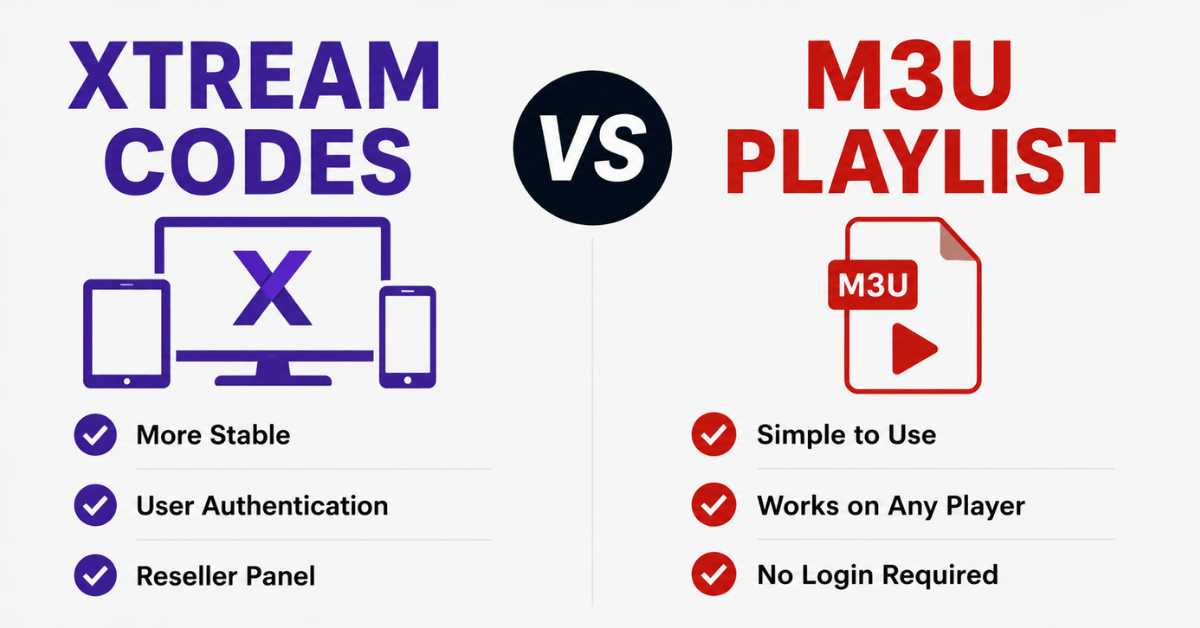
People treat Xtream Codes vs M3U Playlist as two competing products. They aren’t. One is an API-driven delivery system; the other is a flat text file. An M3U playlist is essentially a list of stream URLs with channel names attached. Your player reads the file top to bottom and points at whatever address it finds. Xtream Codes, by contrast, is a login (username, password, server URL) that talks to a panel, and the panel decides in real time which stream to hand you.
That distinction sounds academic until something goes wrong. A flat file can’t make decisions. An API can.
Pro Tip: When a customer says “my M3U stopped working,” nine times out of ten the file is fine — the host behind it changed. With Xtream Codes the same backend change is invisible to the user because the panel resolves the route on every request.
Where M3U Playlists Quietly Win
It would be dishonest to frame Xtream Codes vs M3U Playlist as one-sided. M3U has genuine advantages we lean on constantly:
- Universal compatibility. A raw M3U link plays in VLC, Kodi, almost any smart TV app, and ancient devices that have never heard of an Xtream API.
- Portability. You can host an M3U file anywhere, edit it in a text editor, and split it into custom bouquets for a single client in minutes.
- No API dependency. If a panel’s API layer hiccups, a direct M3U sometimes keeps playing when an Xtream login throws errors.
- Debugging clarity. You can open the file and literally read which URL is failing.
We’ve kept difficult enterprise customers on curated M3U exports purely because their playback hardware refused to behave with anything else.
Where Xtream Codes Pulls Ahead
The reasons the Xtream Codes vs M3U Playlist conversation tilts toward Xtream for most UK IPTV resellers come down to control.
| Capability | M3U Playlist | Xtream Codes |
|---|---|---|
| Live failover between uplinks | No | Yes |
| EPG delivered automatically | Manual/separate | Built in |
| Connection limit enforcement | Weak | Strong |
| Credential rotation without re-sending links | No | Yes |
| Real-time line monitoring | No | Yes |
| Catch-up / VOD metadata | Clumsy | Native |
The credential point is the one resellers underestimate. With M3U, if a line leaks and gets shared across forums, your only fix is generating a new URL and chasing every customer to update it. With Xtream Codes you reset a password and the user reconnects with the same server URL. During one credential-leak incident we contained the damage in under an hour on Xtream lines while the M3U side took two days of support tickets.
The Failover Question Nobody Asks Until It’s Too Late
Here’s the part that actually decides stability. M3U points at an address. If that address goes dark — ISP throttling, a DNS poisoning event, a single overloaded edge server — the file has no instructions for what to do next. It just stalls.
Xtream Codes sits in front of load balancing and DNS routing logic. When one uplink degrades, the panel can geo-route the next request to a backup uplink, often before the buffer empties. This is why the Xtream Codes vs M3U Playlist outcome diverges hardest during peak load.
Pro Tip: During major sports events we watch HLS latency creep on specific ISPs 20–30 minutes before mass complaints arrive. On Xtream-fed lines we reroute silently. On M3U-fed lines, all we can do is email a replacement link and hope the customer reads it before kickoff.
A Mini Case Study in Churn
A new reseller we advised was bleeding subscribers and couldn’t understand why — his stream quality was fine. We reviewed his support log. Almost every cancellation traced back to the same pattern: he’d sold M3U links, one of his upstream hosts kept rotating IPs, and customers interpreted the resulting freezes as “bad service.” The streams were healthy. The delivery method couldn’t adapt. We migrated his base to Xtream Codes logins backed by failover routing, kept the same content, and his monthly churn dropped by roughly a third within two billing cycles. Nothing about the actual channels changed. Only the connection architecture did.
That case is the clearest argument in the entire Xtream Codes vs M3U Playlist discussion: subscribers don’t churn over content they can’t see the backend of. They churn over freezes.
What Support Tickets Reveal
After reviewing hundreds of support requests across reseller accounts, the ticket types split cleanly by method. M3U tickets cluster around “link expired,” “playlist won’t load,” and “channels in wrong order after update.” Xtream tickets cluster around “wrong password” and “too many connections” — which are user errors, not infrastructure failures, and far cheaper to resolve.
A reseller drowning in infrastructure-type tickets is usually a reseller running raw M3U at scale without redundancy planning behind it.
Device Compatibility: The Real Tiebreaker for Subscribers
For a subscriber choosing between the two, the honest answer in the Xtream Codes vs M3U Playlist question depends on hardware:
- Modern IPTV apps (most paid players): Xtream login is smoother, auto-loads EPG, handles VOD.
- VLC / desktop / odd legacy boxes: M3U is often the only thing that works.
- MAG / set-top boxes: these usually want a portal URL, a separate consideration from both.
Checklist for picking your method as a subscriber:
- Does your app have an “Xtream Codes API” login option? Prefer it.
- No such option, only “M3U URL”? Use the playlist.
- Constant freezes on M3U? Ask your provider for an Xtream line with failover.
- Need it on VLC? M3U, every time.
The Security Dimension
M3U links are quietly leaky. The full credentials live inside the URL, so anyone who sees the link has everything. They get pasted into forums, screenshots, Telegram groups. Xtream Codes separates the server URL from the password, and the connection limit on the panel caps how many devices a leaked credential can actually use. It’s not unbreakable — but it gives you enforcement levers that a flat file simply does not have.
So Which Should Resellers Standardise On?
For most operations, the Xtream Codes vs M3U Playlist answer is: lead with Xtream Codes, keep M3U as a fallback offering. Default every new customer to an Xtream login backed by load balancing and backup uplinks, and reserve M3U exports for clients whose hardware demands it or who explicitly want VLC playback. This gives you the monitoring, failover, and credential control that protect retention, while keeping the universal compatibility of M3U in your back pocket.
Resellers who want a panel that handles the failover and DNS routing side properly without building it themselves often start by reviewing infrastructure-focused providers such as British Reseller’s UK IPTV reseller panel, then layer their own bouquets and pricing on top.
The Xtream Codes vs M3U Playlist decision isn’t about which is “better” in the abstract. It’s about which one lets you fix a problem before the customer notices it — and on that single test, Xtream Codes wins more often than not.
Frequently Asked Questions
Is Xtream Codes more reliable than an M3U playlist?
In most real-world setups, yes. The Xtream Codes vs M3U Playlist reliability gap comes from failover. An M3U file points at a fixed host with no backup logic, so if that host is throttled or goes down, playback stalls. Xtream Codes routes through a panel that can switch uplinks in real time, so users rarely notice backend problems.
Can I convert an M3U playlist into Xtream Codes?
Not directly — they’re different mechanisms, not file formats. An M3U is a static link; Xtream Codes is an API login tied to a panel. To “switch,” your provider issues you Xtream credentials (server URL, username, password) for the same package. The content can be identical; only the connection method and the intelligence behind it change.
Which is better for VLC, Xtream Codes or M3U?
For VLC, use the M3U playlist. VLC reads M3U links natively and reliably, while it has no built-in Xtream Codes API support. This is one of the clearest cases in the Xtream Codes vs M3U Playlist comparison where the simpler option is the correct one.
Why does my M3U link keep expiring?
Usually because the provider rotates host IPs or the link was tied to a temporary or shared line. M3U credentials live inside the URL, so any change to the backend address breaks the file. Xtream Codes logins survive most backend changes because the panel resolves routing on each connection.
As a reseller, which method causes fewer support tickets?
Xtream Codes, in our experience. Its tickets skew toward user errors like wrong passwords. M3U generates more infrastructure-type tickets — expired links, wrong channel order, dead hosts — which are costlier to resolve and more likely to trigger cancellations.
Is Xtream Codes safer than sharing an M3U file?
It offers more control. M3U exposes full credentials in one URL that’s easily shared. Xtream Codes separates the password from the server URL and lets you enforce connection limits, so a leaked login can be reset quickly without re-issuing links to every customer.
Do I need EPG separately with M3U?
Often yes. M3U typically requires a separate XMLTV EPG source and manual matching. Xtream Codes usually delivers the channel guide automatically through the API, which is why guide problems appear far more often on the M3U side.
Which uses less bandwidth, Xtream Codes or M3U?
Bandwidth depends on stream quality and codec, not the connection method. Neither inherently saves data. The difference is efficiency under failure: Xtream can reroute around a congested node, indirectly reducing the rebuffering that wastes bandwidth on dead M3U hosts.
Execution Checklist
Subscribers
- Check whether your app supports the Xtream Codes API login; prefer it when available.
- Keep your M3U link private — treat it like a password, because it is one.
- On VLC or legacy hardware, request an M3U export.
- If freezes hit during peak hours, ask your provider whether your line has failover routing.
Resellers
- Default new customers to Xtream Codes logins backed by load balancing and backup uplinks.
- Audit your support log monthly and separate infrastructure tickets from user-error tickets.
- Keep curated M3U exports ready for clients with incompatible hardware.
- Set realistic connection limits to contain credential leaks before they spread.
Sub-resellers
- Confirm with your upstream provider whether failover and DNS routing are actually in place — don’t assume.
- Track which connection method each of your clients uses so you can troubleshoot faster.
- Reset leaked Xtream credentials immediately rather than re-issuing links.
- Push hardware-limited clients toward M3U only when the device genuinely requires it.
That wraps the field view on Xtream Codes vs M3U Playlist. The short version: M3U is the simple, universal fallback; Xtream Codes is the method that lets you fix problems before your customers feel them. Choose based on the hardware in front of you and the failover behind you — not on which name sounds more advanced.