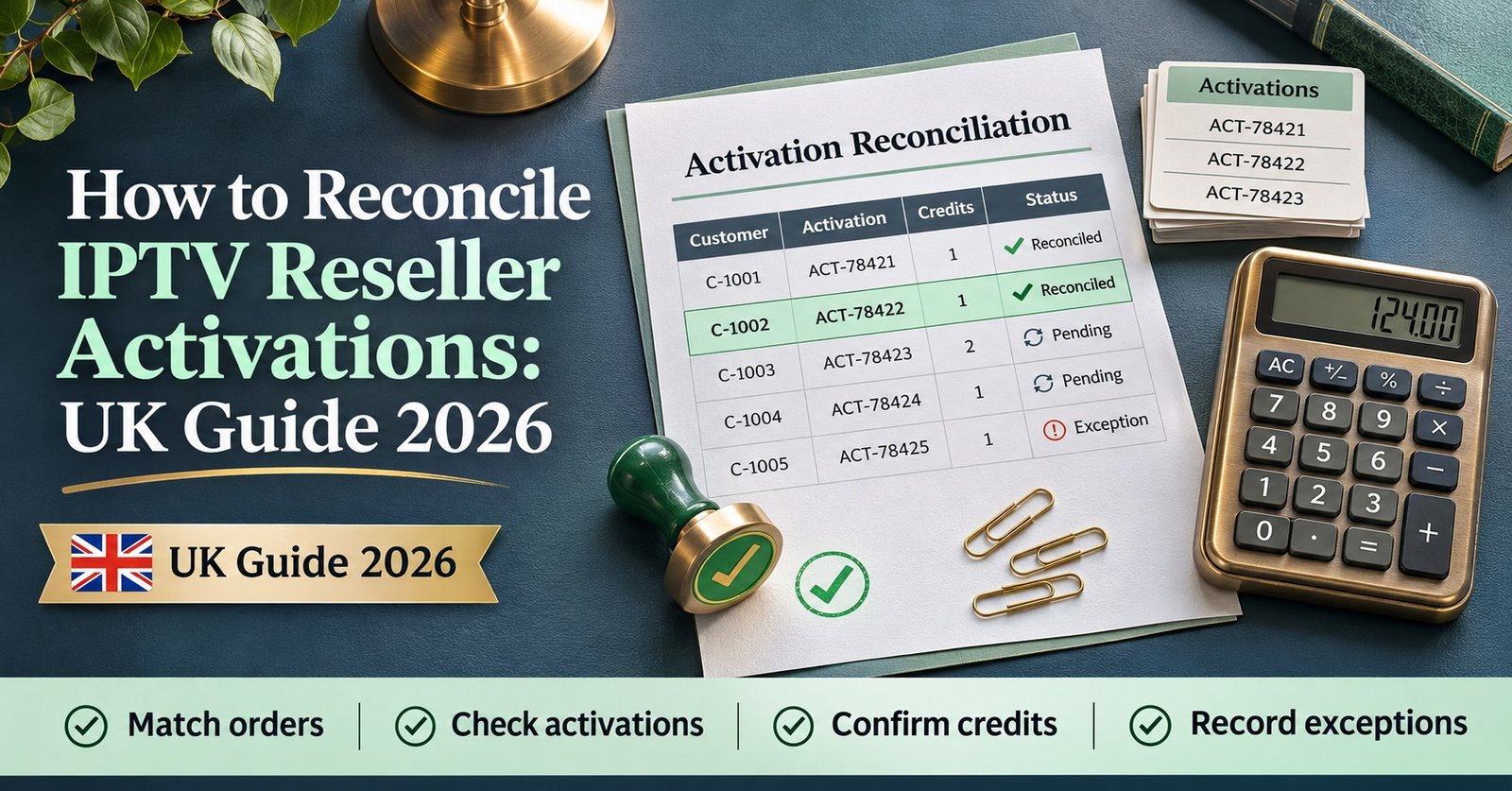

To reconcile IPTV reseller activations, take every activation, renewal and extension your panel recorded in a set period and match each one to the payment or order that should have caused it. Then look into anything that appears on only one side. A clean match means your credits went where the money says they went. An unmatched row means one of three things: you’ve been paid but haven’t delivered, you’ve delivered but haven’t been paid, or you’ve spent credits twice on the same customer.
Most of the gaps you’ll find aren’t fraud. They’re ordinary slips: a renewal entered as a brand-new line, a sale taken at ten to midnight and activated the next morning, a trial that quietly became a paid account before anyone raised an invoice. It’s worth catching these while the customer still remembers paying, and before a month of small differences adds up to a credit balance nobody can explain. If you only have time for one habit, write the order reference against the line when you create it. Nearly every later step depends on that link being there.
What Reconciliation Actually Compares
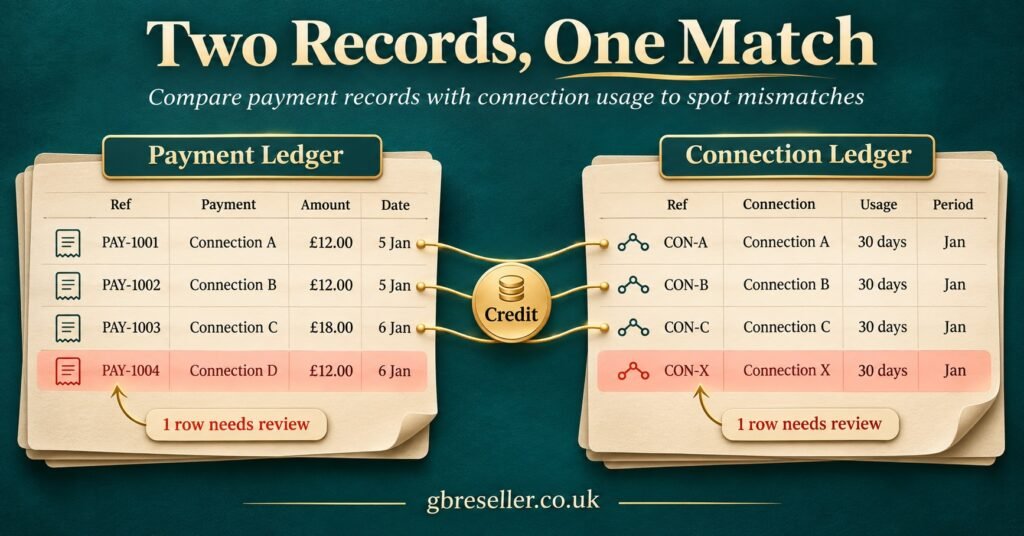
A reconciliation compares events, not totals. The number of active lines on your dashboard tells you very little, because it includes customers who paid months ago and leaves out lines that expired yesterday. What you need is a list of things that happened in the period: each line created, each line extended, each connection added. You set that against a list of money that came in for the same period.
Three records take part. The first is the panel’s own history: an activity log, a credit transaction history, or both, depending on the software. The second is your sales record, which might be invoices, a payment processor export, bank transfer entries or a spreadsheet you keep by hand. The third is your credit balance, which links the two: opening balance, plus credits bought, minus credits used, should equal the closing balance shown in your reseller dashboard.
Different panel events need different evidence, and this is where many resellers get confused at the start:
| Panel event | Should match | Typical evidence |
|---|---|---|
| New line created | A new paid order | Invoice or payment reference |
| Renewal or extension | A renewal payment for an existing customer | Payment linked to the existing username |
| Extra connection or upgrade | An upgrade payment | Order note showing the change |
| Trial line | No payment, but a logged trial request | Trial log entry with a date |
| Line deleted or disabled | A refund, cancellation or error correction | Refund record or internal note |
Trials and corrections are worth including even though no money moves. They still use panel actions, and some setups charge credits for them. If you leave them out, they turn up later as unexplained events.
How to Reconcile IPTV Reseller Activations Step by Step
The process below works for a reseller with twenty customers or two thousand. The only difference is how often you run it and how much of it you automate.
1. Fix the period and the time zone
Choose a start and end time for the period, for example Monday 00:00 to Sunday 23:59 UK time. Export both records for exactly that window. Panels often log in server time, which may not be UK time, and payment platforms sometimes use UTC. If one export is an hour off from the other, every late-evening sale will look like a mismatch. Note the time zone of each export at the top of your sheet.
2. Put everything in one sheet, one event per row
Add the panel events and the sales to a single spreadsheet, using a column to mark which source each row came from. A workable set of columns is:
- Source (panel or sales)
- Date and time
- Event type (new, renewal, upgrade, trial, deletion, refund)
- Customer username or line ID
- Order or invoice reference
- Package and term (for example, one connection, twelve months)
- Credits used or amount paid
- Match status and a short note
Leave passwords, full payment details and anything else you don’t need out of this sheet. Under UK GDPR you’re expected to keep personal data to what the job needs, and a reconciliation only needs enough detail to identify the line and the order.
3. Match on the shared reference first
If you or your team add an order reference to the panel’s notes field when creating a line, most rows will match on that reference straight away. If your panel has no notes field, keep a simple log in your sales record of the username created for each order. That gives you the same link from the other side.
4. Match the rest by customer, date and package
For anything left over, look for a sale and a panel event for the same customer, on the same day or the next, with the same package. Mark these rows “matched by inference” rather than “matched”, so you know the link wasn’t recorded at the time.
5. Check terms and connections on matched rows
A matched row can still be wrong. Compare what was sold with what was activated: twelve months sold but six activated, or two connections paid for but one set up. These mistakes don’t affect your credit count in an obvious way, but they almost always lead to a support ticket later.
6. Prove the credit movement
Add up the credits used by the panel events in the period. Check that opening balance, plus credits bought, minus that total, equals the closing balance. If it doesn’t, an event is missing from your export, or credits moved in a way the log didn’t show, such as a transfer to a sub-reseller. If you need to review how credit packages are structured before this step, the GB Reseller panel and credit overview sets out the options available.
7. Resolve, note and lock
Give every unmatched row an outcome: activated, refunded, chased for payment, deleted, or carried into the next period as a timing difference. Add a one-line note saying what you did and when. Then save the sheet as a closed copy and don’t edit it again. Next week’s reconciliation starts with the carried items from this one.
A Worked UK Example: One Week, Forty-One Orders
The figures below are hypothetical, but the kinds of mismatch are typical of what this process brings up.
A small UK reseller takes payments by card link and bank transfer. For the week ending Sunday, the sales record shows 41 paid orders. The panel shows 43 events that used credits.
Matching on order references from the panel notes links 36 pairs straight away. Matching by customer, date and package adds three more, which leaves 39 matched, 2 sales unmatched and 4 panel events unmatched. When terms are checked on the 39 matched rows, one more problem comes up.
| Item | What it turned out to be | Action taken |
|---|---|---|
| Sale with no activation | Customer paid on Saturday but hadn’t sent device details | Activated on Monday, carried as a timing item |
| Second sale with no activation | Same customer paid twice through the card link | Duplicate payment refunded, note added |
| Panel event with no sale | Line created twice after the page timed out | Unused line removed, credit return requested from provider |
| Panel event with no sale | Trial converted to a paid month before payment arrived | Payment chased, then received on Tuesday |
| Panel event with no sale | Renewal paid the previous Sunday at 23:40 | Matched to the earlier period, the time zone gap explained it |
| Panel event with no sale | Staff test line for a device check, never labelled | Disabled, labelled, and test lines now tagged at creation |
| Matched row, wrong term | Twelve months sold, six months activated | Line extended, customer told |
In this example the credit check came out wrong by exactly the cost of one line, and the duplicate activation accounted for the whole gap. That’s a useful pattern to remember. When the credit gap equals the value of a single event, look for a duplicate before anything else.
Not one of these seven items was dishonest. Even so, if they’d been left alone, the reseller would have had an unpaid account, a customer who’d been charged twice, a lost credit, and a customer who’d find their service ending six months early. All of those come back as support work, and some come back as chargebacks.
Where Reconciliations Usually Go Wrong
Counting active lines instead of events. This is the most common shortcut, and it doesn’t work. A line activated last March and still running says nothing about what you were paid this week.
Trusting a balanced credit figure. Your balance can agree while two errors cancel each other out: a missing activation in one place and an unrecorded credit transfer in another. The credit check confirms the totals. The row-by-row matching is what actually explains them.
Leaving out sub-reseller activity. If sub-resellers draw credits from your balance, their activations belong in your reconciliation. Some panels show their activity in a separate view, and it’s easy to export only your own.
Fixing the panel without leaving a note. Deleting a duplicate or extending a term without recording why means next month’s reconciliation won’t make sense. Every correction should leave a short note.
Deleting lines before checking the credit policy. Whether credits come back after a line is deleted depends entirely on the provider or parent reseller. Some return them within a short window, some never do. Find out before you assume.
Keeping the sheet too briefly, or with too much in it. For a UK limited company, HMRC expects accounting records to be kept for six years from the end of the financial year they relate to, and VAT records are generally kept for six years. Sole traders are generally expected to keep records for at least five years after the 31 January Self Assessment deadline. Your reconciliation supports those records, so keep it for at least as long, but without passwords or payment card data in it.
Treating a clean match as proof the service is legitimate. Reconciliation proves your numbers are consistent. It doesn’t prove the content behind the lines is properly licensed. IPTV is a delivery technology, and whether a service is lawful depends on its distribution rights. Check your provider’s authorisation separately and keep evidence of it.
A Weekly Reconciliation Checklist
- Export panel activity and credit history for the same window, and note the time zone of each
- Export sales, payments and refunds for that window
- Combine them into one sheet, one event per row, with no passwords or card details
- Match on order reference, then by customer, date and package
- Check term length and connection count on every matched row
- Prove opening credits plus purchases minus usage equals closing credits
- Give every unmatched row an outcome and a dated note
- Include trials, test lines and sub-reseller activations
- Carry timing differences into next week’s sheet
- Save a locked copy and keep it with your accounting records
Questions Resellers Ask About Activation Matching
How often should I reconcile?
Weekly suits most small resellers. If you create dozens of lines a day, a quick daily match with a full weekly close catches duplicates before customers notice them. Monthly is the minimum, and errors are noticeably harder to trace by then.
My panel won’t export its activity log. What can I do?
Use whatever history the panel does show, usually the credit transaction list, and record each line’s username in your sales record at the time you create it. If the panel shows history only on screen, save a dated screenshot at each close as your evidence.
Should free trials go into the reconciliation?
Yes, as zero-value rows. Trials are where unpaid conversions tend to hide, and on some setups they use credits or panel quota.
Can I get credits back for a duplicate activation?
It depends on your provider or parent reseller’s policy. Ask quickly, because where returns are allowed there’s often a time limit, and have the line ID and creation time ready.
Do sub-reseller activations count in my reconciliation?
If their credits come from your balance, yes. Reconcile their activity against what they’ve paid you, separately from your own retail customers, so each relationship is easy to read.
What if a customer’s payment and activation fall in different weeks?
Treat it as a timing difference. Match it in the period where the second half lands, and note it in both sheets so it isn’t counted twice.
Closing the Week With Nothing Unexplained
The aim when you reconcile IPTV reseller panel activations isn’t a perfect sheet with no exceptions. Exceptions will always happen. The aim is that every one has a reason, an action and a date next to it. Once that’s routine, the credit balance stops being a mystery, refund disputes come with evidence, and support issues get fixed before the customer has to ask.
Start with the order reference habit this week, even if the rest of the process is still manual. It’s the one change that makes every later reconciliation faster. The other steps can be added one at a time.